For families looking out for someone who lives alone
A gentle daily story of how things look at home
Waloca turns what your Ring cameras and doorbells observe into short, plain sentences. You can see whether today matches the usual routine without watching a single clip.
When something differs, the people you chose are told clearly. Quiet is described as quiet, and "can't tell" is said out loud.
Works with Ring cameras and doorbells. Available in the United States only.
How it works
Three steps, and you stay in charge of each one.
Step 1
Link from the Ring app
In the Ring app, choose which cameras and doorbells Waloca may use. You can change that, or disconnect, at any time.
Step 2
Read a gentle daily story
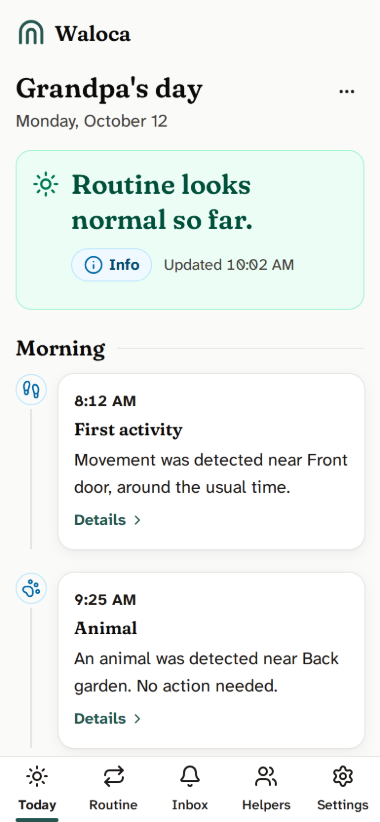
Activity becomes short sentences, grouped into morning, afternoon, evening and night. Each one says what was observed and where.
Step 3
A trusted circle hears what matters
Invite relatives or neighbours as helpers. Each one sees only what you allow: a short summary, and a clear message when something needs a look.
What it looks like
These are screens from the app itself. The household in them is made up.
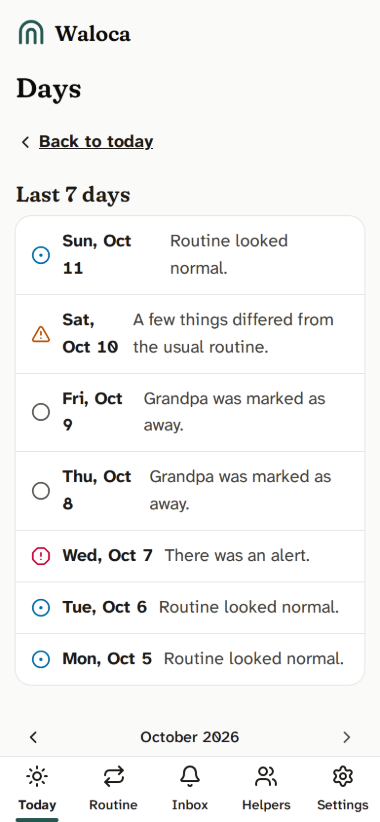
Look back at any day
Pick a day from the calendar. Each day keeps its own story, so you can look back without digging through clips.
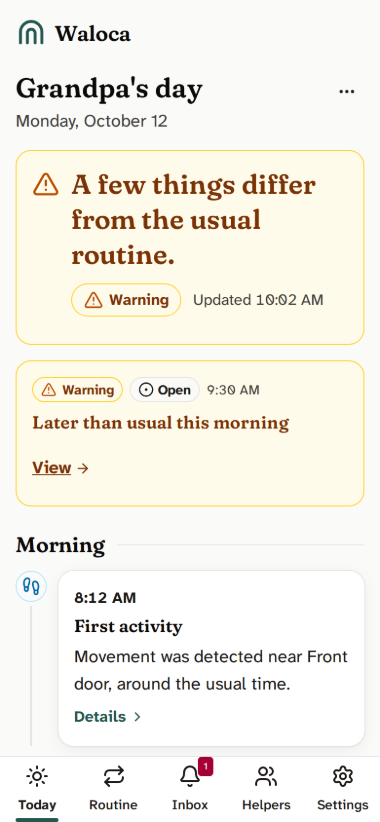
Differences, described plainly
When the day differs from the usual routine, Waloca says what was observed and how that compares. A Warning is a prompt to take a look, not a conclusion.
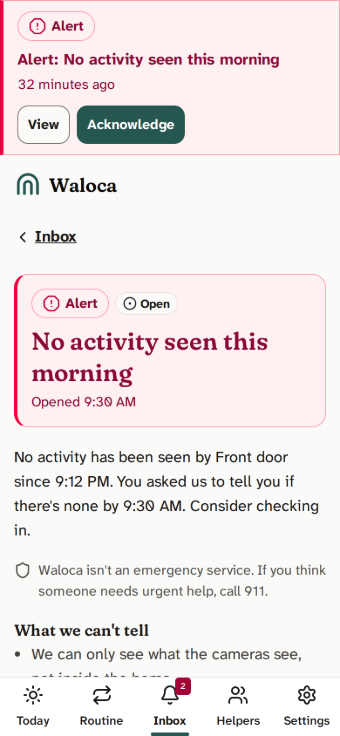
A clear alert, and one tap to say you're on it
Alerts come only from rules the owner confirmed. They say what was observed, what was expected, and what Waloca can't see. A helper can mark that they are checking in, so nobody else has to wonder.
A summary a helper reads in a minute
Helpers choose when they hear from Waloca: a morning summary, an evening one, or only alerts. A summary is short and shows no more than the owner allows.

Honest when it can't tell
If a camera is offline or can't be read, Waloca says so, and says it can't tell. A camera that isn't reporting isn't read as a quiet house.
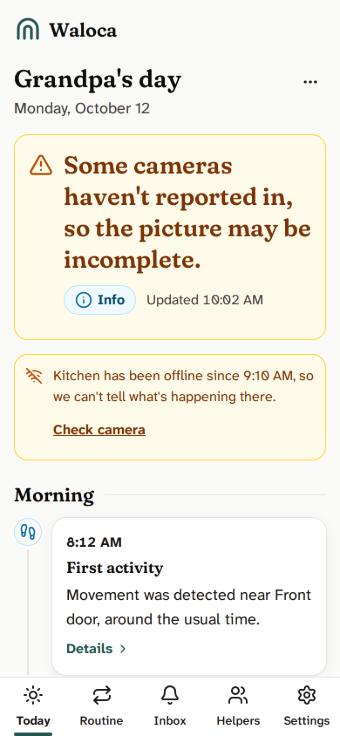
Three levels, in plain words
Every message is one of three levels. Each has its own icon and word, so colour is not the only cue.
Info
Good to know. It is part of the story or a summary, and nothing interrupts you.
Warning
Something differs from the usual routine. A timely message to the people who chose to get them. A prompt to look, not a conclusion.
Alert
Rare, and immediate. It is sent when a rule the owner confirmed trips and the cameras can be relied on. It says what was observed, and asks someone to consider checking in.
Learned routines alone don't go above Warning. An Alert needs a rule the owner confirmed, and cameras that are reporting.
A circle, not a crowd
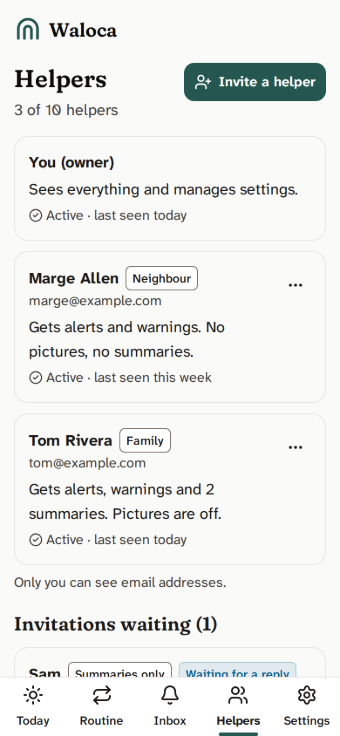
The owner, usually the person with the Ring account, decides who joins and what each person sees. A relative may see the full story. A neighbour may get alerts only, with no pictures and no camera names.
- Presets for family, neighbour and summary-only helpers, adjustable one permission at a time.
- Anyone can be removed in one step, and their access ends at once.
- Helpers can acknowledge an Alert, so the circle knows someone is on it.
Your privacy comes first
Waloca is built to collect and keep as little as it can.
No face or identity matching
Waloca doesn't try to work out who anyone is. "One person appears" doesn't turn into a name.
Pictures are kept briefly
Small pictures are off unless the owner turns them on. They are kept for 7 days by default, and the owner can choose a shorter or longer time.
Encrypted with a key for each household
Names, camera names, pictures and the text of your stories and alerts are encrypted with a key that belongs to your household.
Deleted when you say
Delete your household whenever you like, or disconnect Waloca in the Ring app. We delete its data and destroy that key. Copies in encrypted backups expire within 15 days.
No selling, no AI training, AI optional
Waloca doesn't sell your data or use it to train AI models. AI can describe a picture or polish wording, only if the owner turns it on. It doesn't decide what is an Alert or who is notified, and everything works with AI switched off.
You stay in control
The owner chooses which cameras are used, who sees what and when summaries arrive, and can pause Waloca or mark someone as away. Helpers see only what the owner allows.
What Waloca can't do
Waloca is a reassurance companion, not a safety system. Please read this part.
It can't call for help
Waloca doesn't detect health problems or accidents, and it can't send anyone to help.
It can't see inside the home
Waloca knows only what the cameras observed. Rooms without a camera are out of view, and a camera can miss things.
Quiet isn't a verdict
"No activity observed" means exactly that. It doesn't tell you how anyone is doing, and it is no substitute for a phone call or a visit.
Waloca isn't an emergency service. If you think someone needs urgent help, call 911.
Who it's for
Waloca is for people who look out for each other, and who already have a Ring camera or doorbell at home. It needs no new hardware.
Families
The relative who sets things up, reads the summaries and decides who else is included.
Neighbours
A neighbour can be a helper too, with permissions limited to what the owner chooses, for example alerts only.
The person at home
Waloca is meant to be agreed with the person who lives there. The owner confirms that during setup.
Questions
Do I need new cameras?
No. Waloca works with the Ring cameras and doorbells you already have.
Does Waloca show live video?
No. It reads activity updates from Ring and, if the owner switches it on, small pictures taken when something is observed. There is no live view.
Will Waloca know if someone needs help?
No. It can only say what the cameras observed and what they didn't, and how that compares with the usual routine. Waloca isn't an emergency service. If you think someone needs urgent help, call 911.
How long does it take to learn a routine?
About two weeks. Until then Waloca describes what it observes without comparing it to a routine, and says so.
Who can see what?
Only people the owner invites. The owner picks what each helper sees. For example, a neighbour can receive alerts only, with no pictures or camera names.
Is everything encrypted?
Names, camera names, pictures and the text of your stories and alerts are encrypted with a key that belongs to your household. Some operational information is not encrypted field by field: the times and counts of detected activity, time zone and settings, and technical identifiers. It carries no names or contact details, and it is stored encrypted at rest on disk and in backups.
What does it cost?
Pricing hasn't been announced, and this page doesn't sell anything.
Where is it available?
In the United States only. The Ring Appstore and the devices it works with are US-only.
How do I stop?
Disconnect Waloca in the Ring app, or delete your household in Waloca. Either way, your data is deleted, as described in the privacy policy.
How to start
Waloca is available in the United States only, for Ring cameras and doorbells.
Open the Ring app
Open the Appstore in the Ring app, find Waloca, and choose the cameras and doorbells to share.
Create your Waloca account
We email you a code. There is no password to remember.
Set up and invite helpers
Tell Waloca about the person at home, label the cameras, and choose who hears from Waloca and when.
Questions before you start? Write to us and we will reply by email.
Already have an account? Sign in
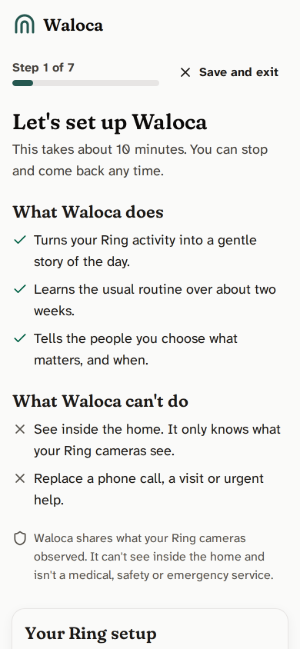
Read the story, not the clips
Waloca turns the cameras you already have into a short, honest note about the day.